What's the difference between Telegram Web K and A? Download compatibility and switching methods
What's the difference between Telegram Web K and A? Download compatibility and switching methods
Telegram Web K and Web A are both official Telegram web clients, with entry points at /k/ and /a/ respectively. Neither version is permanently better for downloads: native buttons depend on message permissions, and extension buttons are also affected by site access and page structure. When the button is missing, switch and retest using the same authorized, playable message; switching does not increase permissions or remove content protection.
The cover is a conceptual illustration of switching between two web clients and saving media locally; it is not a real interface screenshot of Telegram, Chrome, or the extension.
The answer first: both K and A are official, the difference is mainly in front-end implementation
The official Telegram apps page lists both WebK and WebA; the official Telegram issue platform explains that keeping two versions is for "internal competition," and both target desktop and mobile browsers. They are not in a "stable vs. beta" relationship, and you cannot judge which is newer just by version number size, because the two projects use different versioning systems.
| Comparison dimension | Telegram Web K | Telegram Web A | Significance for download decisions |
|---|---|---|---|
| Official entry | https://web.telegram.org/k/%60 | https://web.telegram.org/a/%60 |
Directly change the path in the address to switch, avoiding reliance on menu text that may change | |
| Front-end project | Independent WebK project; official repository states it is an improvement based on Webogram | Independent WebA project; official repository states it uses its own Teact framework and customized GramJS | Page structure, media viewer, and menus update separately; extension buttons may temporarily mismatch in one version |
| Verified version on 2026-08-22 | Deployment page runtime info is 2.2 (673) |
Official deployment's version.txt is 12.0.40 |
The two numbers cannot be compared directly; they are only for reproducing issues |
| Extension evidence used in this article | Product installation page currently directs to Web K | Chrome store entry states compatibility with Web A | Store claims and manifest match scope support the expectation that "both versions work," but do not guarantee that all button locations will be immediately compatible after every front-end update |
| When to prefer | Current process works, or you want to follow the product installation page demo | When the button is missing in K, switch to A with the same message for comparison | Keep the version that can stably complete your current legal task; there is no need to switch just for the letter itself |
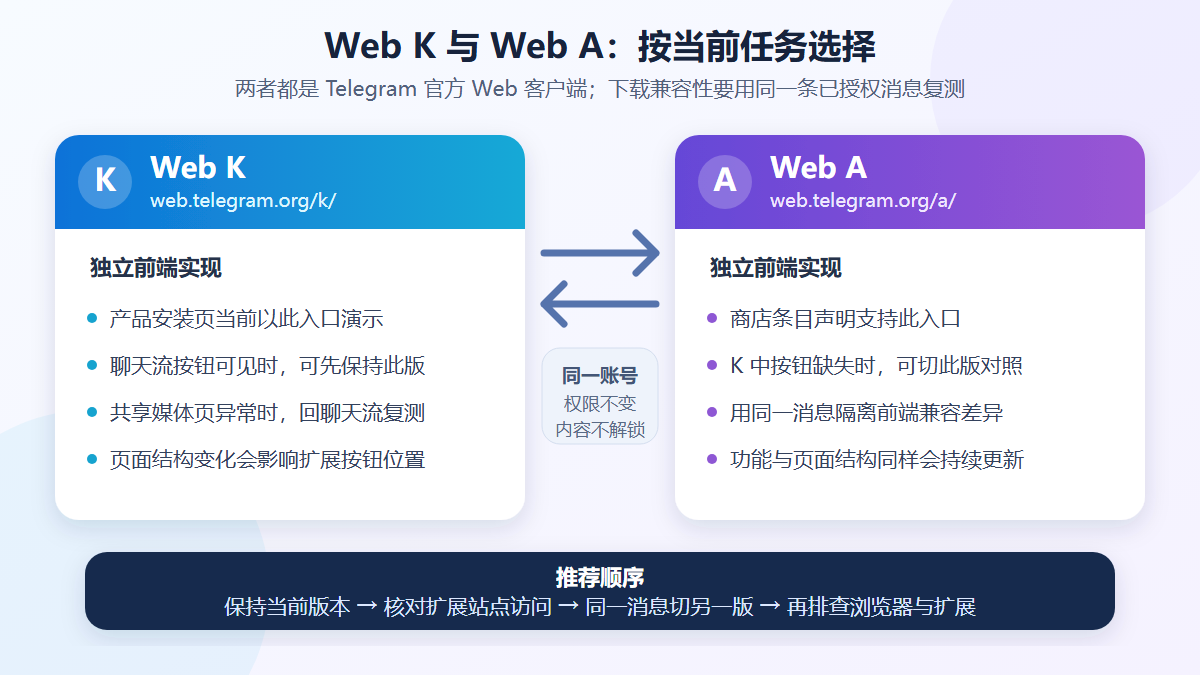
The above is a selection illustration based on official entry points, product pages, and current verification results; it is not a real interface of Telegram or the extension.
Native download buttons and extension buttons are not the same thing
Before troubleshooting, distinguish the two entry points:
- Telegram native download entry is rendered by Web K or Web A itself, and is also affected by whether the message has finished loading, account access rights, and channel content protection.
- Extension-injected button is added by the browser extension. Besides depending on your ability to view the media, it also depends on the extension being enabled, being allowed to access
web.telegram.org, and being able to recognize the page structure of the current version. - The actual download result is recorded by the Chrome download system. A button appearing or a progress animation does not mean the file has been successfully written locally; go to
chrome://downloadsto confirm.
The extension version verified in this article is 2.2.5.8. The Chrome Web Store entry explicitly lists Web K and Web A; the site match scope of the local same-version manifest is https://web.telegram.org/*%60%EF%BC%8C%E4%BB%8E URL 范围看覆盖 /k/和/a/`. However, matching the page only means the extension can run on that site; it does not by itself prove that every current media layout can be correctly recognized.
If not yet installed, you can enter the official store entry from Telegram Video Downloader extension installation page. Before installing, check the current version, update time, developer, permissions, and privacy disclosure; do not rely on old information from this article.
Why switching versions can sometimes recover the download button
Web K and Web A adjust the chat stream, media viewer, and "shared media" pages separately. Extensions usually need to recognize media elements in these pages; when one version changes its structure, the extension may still be able to recognize the same message in the other version. Switching versions is therefore suitable for isolating front-end compatibility issues, not for changing Telegram permissions.
A user report on the official Telegram issue platform in 2026 recorded this difference: the reporter said the extension button behaved differently in Web A, Web K chat streams, and media pages, and the issue was finally marked as Fixed. This is a user-submitted issue record; it can only prove that front-end changes may cause temporary differences, and cannot be used to assert that K or A is more compatible in the long term.
If this is your first time using the download process, first follow Telegram Web single and batch download tutorial to establish a working baseline; if you have already encountered errors or Chrome download failures, then use Troubleshooting Telegram video download failures to locate the issue layer by layer.
Steps to switch and retest between Web K and Web A
Before starting, choose a message that you uploaded, that is publicly allowed to be saved, or for which you have obtained explicit permission. It must be accessible in the current account, and the video preview or player must load normally. Do not use content that you do not have access to, that has been deleted, or that is explicitly prohibited from being saved for compatibility testing.
- Record the current baseline. Check whether the address bar is
/k/or/a/, and note the message location, the missing button area, the current time, and the extension version. It is best to keep only one Telegram Web tab for the first comparison. - Directly open the other official entry point. If you are currently on K, open
https://web.telegram.org/a/%60%EF%BC%8C%E5%BD%93%E5%89%8D%E6%98%AF A 就打开https://web.telegram.org/k/%60%E3%80%82%E5%85%88%E4%B8%8D%E8%A6%81%E6%B8%85%E9%99%A4 cookies, site data, or reinstall the extension, to avoid changing multiple variables at once. - Check extension site access. Open
chrome://extensions, enter the extension's "Details", confirm the extension is enabled, and allow it to read and change site data onweb.telegram.org. Google's official help states that site access can be set to on click, on the current site, or on specific sites; the permission wording changes with Chrome's language. - Return to the same message. Wait for the chat history, video preview, and player to fully load; if you only cannot see the button on the "shared media" page, return to the same message in the original chat stream and test again.
- Check the two types of buttons separately. First see whether the Telegram native menu provides a legal save entry, then see whether the extension button appears. Do not treat the lack of a native entry and the lack of extension injection as the same issue.
- Confirm the actual download result. Click the test download only once, then open
chrome://downloads, check whether the status is completed, failed, blocked, or still in progress, and open the actual folder from the record.
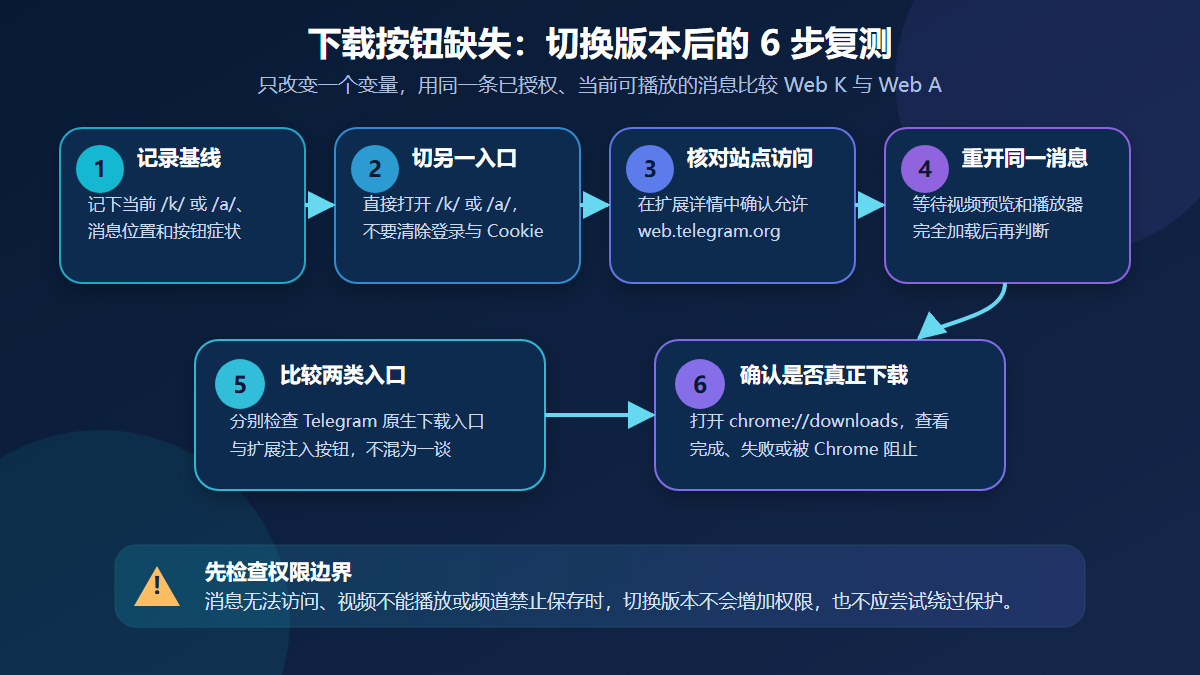
The above is a diagnostic process illustration; menu and button locations change with Telegram, Chrome, and extension versions.
Choose the next step by symptom
| Symptom | More likely cause | Suggested action |
|---|---|---|
| K has the extension button, A does not, or vice versa | The two front-ends have different structures, and the current extension only recognizes target elements in one of them | Temporarily use the working official version, record both version numbers, message location, and screenshots, then report to the extension support |
| Both versions can play, but neither has the extension button | The extension is not enabled, site access is not authorized, the script is not loaded, or the current media layout has not been recognized yet | Check chrome://extensions and site access; refresh once and retest in the original chat stream |
| The "shared media" page has no button, but the original chat stream does | The media page and chat stream use different page structures, or the media has not fully loaded | Use the currently visible entry in the chat stream; do not treat the empty list before scroll loading as a completed scan |
| Both versions lack the Telegram native download entry | The message has not finished loading, the account has no access, the channel has content protection enabled, or this media type has no current entry | First confirm playback and permissions; if the content owner prohibits saving, stop and apply for authorization |
| No local file after clicking the button | Chrome blocked the download, automatic download policy, save dialog, disk, or network issue | Go to chrome://downloads to see the specific status, and refer to the download failure troubleshooting article |
| Requires login again after switching | The current session state was not reused by the other client, or browser site data is restricted | Only log in on the official web.telegram.org domain; do not scan QR codes on unfamiliar pages, and do not give verification codes to anyone |
| File is complete but cannot be found | The Chrome save location was changed, or "ask each time" is enabled | From the download record, click "Show in folder", then see Windows and Mac save path guide |
Which should you choose, K or A?
The safest answer is: if your current version can stably complete your legal task, keep using it. The product installation page used Web K as the demo entry point during this verification, so new users can first establish a baseline with K; if K's download button is missing on the same playable message, then switch to A for comparison. Those who are already used to Web A and whose buttons work normally do not need to switch to K because of a tutorial example.
Follow three principles when choosing:
- Do not treat the version numbers of K or A as a "new vs. old ranking"; the two use different versioning systems.
- Change only the web version variable each time; do not clear cache, reinstall the extension, switch accounts, and change messages at the same time.
- Treat "can view," "allowed to save," "extension can recognize," and "Chrome successfully wrote the file" as four independent checkpoints.
For publicly accessible single Telegram message links, you can also first try Telegram online tools; links that require login, invitation, or private permissions cannot gain access by pasting the URL.
Verification environment and scope
| Verification item | Record on August 22, 2026 |
|---|---|
| Operating system | Windows 11 Pro, version 10.0.26200 |
| Browser | Google Chrome 151.0.7922.138 |
| Telegram Web K | Official entry accessible; deployment runtime info is 2.2 (673) |
| Telegram Web A | Official entry accessible; deployed version.txt is 12.0.40 |
| Extension | Chrome Web Store version 2.2.5.8, store shows update on 2026-06-08; extension ID gnkkimhkpmldcibibpdhegbjcgdpiakc |
| Site scope | Local same-version manifest matches https://web.telegram.org/*%60%EF%BC%8CURL 范围覆盖 /k/与/a/` |
| Verification boundary | Checked public entry points, official source code, deployment versions, store and product pages, manifest site scope; did not log into private accounts, download protected content, or claim that speed, success rate, file limits, or all media layouts have been tested |
Both web clients and extensions can update automatically. When reproducing an issue, record the version displayed on your device that day; do not treat the above table as the latest version long-term.
Permissions, privacy, and legal use boundaries
- Switching between Web K and Web A does not join private channels, restore deleted messages, increase account permissions, or remove content protection.
- Only save media that you own, that is publicly allowed to be downloaded, or for which you have obtained explicit permission, and comply with Telegram's terms, content owner conditions, copyright, and local laws.
- Browser extensions are third-party tools and are not affiliated with Telegram. Before installing, check the store developer, current permissions, and privacy disclosure; grant only the site access needed to complete the task.
- Do not provide Telegram verification codes, two-step verification passwords, login QR codes, cookies, session files, or complete chat exports to any website or support personnel.
- Do not use bulk scripts to scrape channels or use downloaded content for training, indexing, or redistribution. Telegram's content licensing terms require that access to user content conforms to normal, lawful, and intended use, and complies with the rights holder's restrictions.
- If a message cannot be accessed, a video cannot be played, or the content owner prohibits saving, stop and contact the administrator or rights holder instead of attempting to bypass restrictions.
Frequently Asked Questions
Which is better for downloading videos, Telegram Web K or A?
There is no permanently better version. If your current version consistently shows a legal download entry, keep using it; the product installation page currently uses K for demonstration. If the button is missing in K, switch to A using the same playable message for comparison. Native permissions and extension compatibility should be judged separately.
Will switching from K to A log me out of Telegram?
Both are on web.telegram.org, but whether the session is directly reused depends on the current client state, browser settings, and site data. Do not clear cookies before switching; if you need to log in again, only do so on the official domain, and never provide verification codes or login QR codes to anyone.
Why does the extension button appear only in one of K or A?
Web K and Web A are independent front-ends, and the media viewer and chat stream structures update separately. The extension may temporarily recognize only one of the structures. Record both version numbers, the same message, and the button location, use the version that works, and provide reproduction information without private content to the extension support.
The Chrome store says it supports both versions, why is there still no button?
The store description and the match range of web.telegram.org/* only prove that the design target covers both versions; they do not guarantee that all media layouts will be immediately compatible after every Telegram front-end update. Also check whether the extension is enabled, site access, message loading position, and Chrome download policies.
Can switching Web versions download protected or unauthorized videos?
No. Switching only replaces the web client; it does not change account access rights, channel content protection, or copyright permissions. When you cannot view, play, or get permission to save, stop and contact the content owner.
How can I confirm that the video was actually downloaded successfully?
Open chrome://downloads to check the final status of the entry, then use "Show in folder" from the record to open the actual location. A button, progress animation, or prompt on the webpage does not mean the file has been completely saved.
Sources and update time
- Telegram official app list: WebA and WebK
- Telegram official issue platform: why are there two Web versions
- Telegram Web K official source code repository
- Telegram Web A official source code repository
- Chrome Web Store: Telegram Video Downloader
- Google Chrome Help: install, manage, and set extension site access
- Chrome for Developers: extension URL match patterns
- Telegram issue platform: user report on extension detection differences across Web K, Web A, and media pages
- Telegram content licensing terms
Update time: August 22, 2026. Versions, menus, site permissions, and button locations may change; please refer to the official pages, Chrome Web Store, and what your device displays on that day.